Showing posts sorted by relevance for query android. Sort by date Show all posts

How to Install Linux On Android Phone Without Rooting


Kali Linux is widely used OS for penetration testing and best for creating dummy environment to test the various hacking attacks. And this cool OS can now can get installed on your android too, you must be wonder from this but it is possible, and this too without rooting your android as it can voids your android warranty so better to go for the method that can be done without rooting your android. You can easily install Kali Linux on your android with our complete guide discussed below.

How to Install Linux On Android Phone Without Rooting

In this method you will be installing all the linux files on your android by downloading them and then using the complete interface for your pentesting or any other security attacks that you like. And this all with a cool app GNURoot that we had explained below. So read out the all the steps below to proceed.

Installing Linux On Android Without Rooting:


 First of all you need to download and install a cool android app in your android that is GNURoot this is the only app that will let you to install Linux files on your android and thats too without rooting as it will be creating a fake Linux running platform on your android..In this app you will find lots of distro linux roots that are Wheezy, Fedora, Aboriginal and Gentoo, these are the platform that will allow other Linux application to run on them choose any of then simply tap on “Create New Rootfs” and wait for the process to get complete.

Now after the download is complete simply select the destro in the second drop down list and then simply tick on the option “Launch as Fake Root” and then tap on Launch Rootfs that will launch all Roots file on a fake platform and you will be able to do so using this cool app .


That's it you are done, Linux is successfully installed on your android device and now you can easily install the extra packages on your android device that you wish to have on your android like a command terminal packages and any of the other packages that you will get over the internet and then install it on your device.

So above is all about Install Kali Linux On Any Android Without Rooting. With this you can easily test your knowledge about pentesting attacks on your android using the app discussed above and that too without risking your android’s warranty by rooting it. And hidden access to your android controls will be get unlocked and you can perform certain testing on those too. So try out this today.

Hope you like our work, do share with others too. Leave a comment below if you facing any problem at any step discussed above.

New Android Malware Which Delete and Erase Everything


Android users are being warned about a new strain of malware called Mazar Bot that is hitting smartphones, giving attackers full administrative rights to monitor and control nearly every aspect of the phone.

This Android malware has been making waves recently that have the capability to gain root access on your smartphone and completely erase your phone's storage.

Mazar BOT, the serious malware program is loaded with so many hidden capabilities that security researchers are calling it a dangerous malware that can turn your smartphone into a zombie inside hacker's botnet.

Mazar BOT was discovered by Heimdal Security while the researchers at the firm were analyzing an SMS message sent to random mobile numbers and locations.

Heimdal Security Team has recently analyzed a text message sent to random mobile numbers. The Geographical extent is so far unknown, so please exercise caution.
The SMS / MMS in question arrives with the following contents (sanitized by Heimdal Security):
You have received a multimedia message from +[country code] [sender number] Follow the link http: //www.mmsforyou [.] Net / mms.apk to view the message.

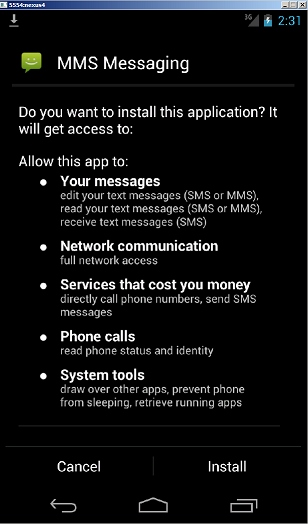
This new Android app has a generic name, MMS Messaging, that asks for admin level privileges. Most of the users end up giving the root access to the malicious app due to its common name.


android-mazar-admin-rights
Team has identified the malicious APK to be the Mazar Android BOT, a threat also that Recorded Future spotted in November 2015.
The malicious packet (APK) retrieves TOR and installs it on the victim’s phone via the following harmless URLs:
https: //f-droid.org/repository/browse/?fdid=org.torproject.android
https: //play.google.com/store/apps/details?id=org.torproject.android
In the next phase of the attack, the infection will unpack and run the TOR application, which will then be used to connect to the following server: http: // pc35hiptpcwqezgs [.] Onion.
After that, an automated SMS will be sent to the number 9876543210 (+98 is the country code for Iran) with the text message: “Thank you”. The catch is that this SMS also includes the device’s location data.

How Mazar BOT Works


Despite other Android malware that distributes itself by tricking users into installing an app from third-party app stores, Mazar spreads via a spam SMS or MMS messages that carry a link to a malicious APK (Android app file).

Once the user clicks the given link, he/she'll be ending up downloading the APK file on their Android devices, which when run, prompts the user to install a new application.


According to Andra Zaharia, security specialist at Heimdal Security, this could lead to Man-in-the-Middle (MITM) attacks which are often used to steal sensitive details such as email account logins, social media credentials and banking information.

What does Mazar BOT do


Once gaining root access on the victim's device, Mazar BOT 
This will allow the attackers to:
  • Gain boot persistence to help survive device restarts
  • Send and Read your SMS messages
  • Make Calls to your contacts
  • Read the phone's state
  • Plague phone's control keys
  • Infect your Chrome browser
  • Change phone settings
  • Force the phone into sleep mode
  • Query the network status
  • Access the Internet
  • Wipe your device's storage (the most critical capabilities of all)

Mazar BOT Browses Internet Anonymously Using TOR


Besides these tasks, Mazar BOT can also download a legitimate TOR (The Onion Router) Android app on your smartphone and install it too, even without your consent or permission.

Using TOR app, the malware would be able to surf the Internet anonymously via the Tor network.

Once the malware installs TOR on victim's phone, Mazar BOT sends a "Thank you" message to anIranian phone number (9876543210), along with the device's location.

In some instances, Mazar BOT also installs an Android app called Polipo Proxy that establishes a proxy on the device, allowing the malware's author to spy on victim's Web traffic and carry out Man-in-the-Middle (MitM) attacks.

Who is Behind This Awful Malware?


Mazar BOT is believed to be distributed by a Russia-based group of cyber-criminals.

One clue to this assumption is: Mazar BOT cannot be installed on Android smartphones in Russia, as its source code includes instructions on how to stop the malware installation process on phone configured with the Russian language.

Another clue is: There is an unwritten law in Russia that says "if cyber criminals don't go after Russians, Russian authorities will not go after them." Moreover, there is no such indication yet that this Mazar BOT campaign has affected anyone in Russia.

Until now, Mazar BOT for Android has been advertised for sale on several Russian underground (Dark Web) forums, but this is the first time this creepy code has been abused in active attacks.

How to Protect Yourself from Mazar BOT


There are standard protection measures you need to follow to remain unaffected:

  1. NEVER click on links in SMS or MMS messages sent to your phone.
  2. Go to Settings → Security → Turn OFF "Allow installation of apps from sources other than the Play Store" option.
  3. Always keep an up-to-date Anti-virus app on your Android devices.
  4. Avoid unknown and unsecured Wi-Fi hotspots and Keep your Wi-Fi turned OFF when not in use.

Latest Android Hacking Apps 2016


#1 Hackode

Download Link - Hackode
Hackode : The hacker’s Toolbox is an application for penetration tester, Ethical hackers, IT administrator and Cyber security professional to perform different tasks like reconnaissance, scanning performing exploits etc.

#2 Androrat

Download Link - Androrat
Remote Administration Tool for Android. Androrat is a client/server application developed in Java Android for the client side and in Java/Swing for the Server.

#3 APKInspector

Download Link - APKInspector
APKinspector is a powerful GUI tool for analysts to analyse the Android applications. The goal of this project is to aide analysts and reverse engineers to visualize compiled Android packages and their corresponding DEX code.

#4 DroidBox

Download DroidBox
DroidBox is developed to offer dynamic analysis of Android applications.


#5 Burp Suite

Download Burp Suite
Burp Suite is an integrated platform for performing security testing of web applications. Its various tools work seamlessly together to support the entire testing process, from initial mapping and analysis of an application’s attack surface, through to finding and exploiting security vulnerabilities.


#6 ZanTi

Download Zanti
zANTI is a comprehensive network diagnostics toolkit that enables complex audits and penetration tests at the push of a button. It provides cloud-based reporting that walks you through simple guidelines to ensure network safety.

#7 Droid Sheep

Download Droid Sheep
DroidSheep can be easily used by anybody who has an Android device and only the provider of the web service can protect the users. So Anybody can test the security of his account by himself and can decide whether to keep on using the web service.

#8 dSploit

Download dSploit
dSploit is an Android network analysis and penetration suite which aims to offer to IT security experts/geeks the most complete and advanced professional toolkit to perform network security assessments on a mobile device.

#9 Arpspoof

Arpspoof is a tool for network auditing originally written by Dug Song as a part of his dsniff package. This app redirects traffic on the local network by forging ARP replies and sending them to either a specific target or all the hosts on the local network paths.

#10 Shark for Root

Traffic sniffer, works on 3G and WiFi (works on FroYo tethered mode too). To open dump use WireShark or similar software, for preview dump on phone use Shark Reader. Based on tcpdump.


#11 Nmap for Android

Nmap (network mapper) is one the best among different network scanner (port finder) tool, Nmap mainly developed for Unix OS but now it is available on Windows and Android as well. Nmap for android is a Nmap apps for your phone! Once your scan finishes you can e-mail the results. This application is not a official apps but it looks good.

How To Root Android Phone or Tablet Without pc [Easiest Way]


Root your android device by using an application on the mobile itself 
And no need of computer  

Before starting charge your device at least 20 percent

Access PC to their smartphones by using Wi-Fi.


In our homes TV, Blu-Ray player, and DVR all come with remote controls, but if you use a Android as a remote to control your Computer, nothing comes in the box. Fortunately, if you have an Android phone, you can control just about everything on your PC.

See Who is Connected to Your WIFI Through Your SmartPhone


There is an App Called Fing Shows You All the Devices Connected to Your Network


Android/iOS: Fing shows you all of the devices on your network, down to the device type and manufacturer for each. Best of all, it puts all of that data in the palm of your hand.

Fing has been around for a while, but it's a quick solution for anyone who wants to take a peek at network activity from their mobile device. Just launch the app to see a list of connected devices, their IP and MAC addresses, customisable device names, and manufacturers. Tap a device to add notes, as or change the name, icon, or location. In addition, Fing keeps a full history of your discovered networks for reference.

Fing is a handy app for day to day use of knowing who you're connected with. 

It's available for free for iOS and Android.

Fing - Network Tools | Google Play Store 
Fing - Network Scanner | iTunes App Store


what is Linux ?


Just like Windows 7, Windows 8, and Mac OS X, Linux is also an 
operating system.

Linux is a free, open-source, UNIX like operating system. As you continue to learn how to hack, you will realize how important it is to learn how to use 
the Linux operating system.

Most of the server on the web run Linux
Beginner hacker should run Linux
Some of the best hacking programs only run on Linux. 


A Linux distribution is the Linux kernel + a collection of Applications